
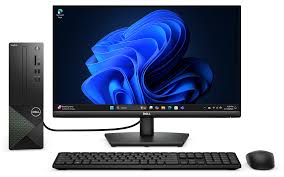
Computer Systems:
Computers have become the backbone of modern life. From education and business operations to entertainment and online services, every activity today relies on efficient and reliable computing. Whether it is a laptop, desktop, all-in-one system, or workstation, a properly functioning computer is essential for productivity and everyday tasks. As technology continues to advance, maintaining computers through professional repair and service has become more important than ever. This article explores the core components of a computer, common issues, maintenance needs, repair services, and why expert support is necessary for long-term system health.
1. Introduction to Computer Systems
A computer is an electronic device designed to process data and execute a wide range of tasks. It consists of hardware components that perform physical operations and software programs that instruct the hardware on how to work. Over the years, computers have evolved from large room-sized machines to ultra-compact, high-performance devices used in homes and businesses.
Computers are used for:
- Work and office tasks
- Online communication
- Data storage and management
- Design, development, and programming
- Gaming and multimedia
- Education and online learning
- Security monitoring and automation
As their usage grows, so does the need for regular computer servicing, upgrades, and repairs.
2. Types of Computers
2.1 Desktop Computers
Stable and powerful systems ideal for offices, homes, and commercial use. They provide excellent performance, upgrade options, and long lifespan.
2.2 Laptop Computers
Portable and versatile, laptops are widely used for business, online classes, and mobility tasks. They require more delicate servicing due to compact internal components.
2.3 All-in-One PCs
A modern form of desktops where the CPU is built into the monitor. These are space-saving and stylish but more complex to repair.
2.4 Workstations
High-performance systems used for designing, video editing, programming, and heavy computational tasks.
2.5 Mini PCs & Thin Clients
Compact systems used for lightweight computing, office tasks, and POS applications.
3. Key Components of a Computer
Every computer consists of essential hardware parts:
3.1 Processor (CPU)
The brain of the computer responsible for executing instructions.
3.2 RAM (Memory)
Allows multitasking and improves system speed.
3.3 Storage Drive (HDD/SSD)
Stores operating systems, files, applications, and user data. SSDs provide much faster performance.
3.4 Motherboard
Connects all components and manages data flow.
3.5 SMPS / Power Supply Unit
Provides power to all hardware components.
3.6 Display / Monitor
Visual output device for desktops; laptops have built-in displays.
3.7 Keyboard & Mouse
Essential input devices for navigation and typing.
3.8 Graphics Card (GPU)
Used for gaming, editing, visualization, and design tasks.
4. Common Computer Problems
Computers can face various hardware and software issues over time. Some of the most common issues include:
✔ Slow performance
✔ Blue screen errors
✔ Booting problems
✔ Cracked or flickering laptop screens
✔ Overheating and noise
✔ Battery not charging
✔ Keyboard or touchpad malfunction
✔ Software crashes and virus attacks
✔ Hard disk failure
✔ Network connectivity issues
✔ No display / system not turning on
Ignoring minor issues often leads to major hardware failure, data loss, or expensive repairs.
5. Professional Computer Repair Services
A trained computer technician can diagnose and repair all types of problems for desktops, laptops, and workstations. Professional computer service includes:
5.1 Software Repair & Troubleshooting
- Operating system installation
- Virus removal
- System optimization
- Driver updates
5.2 Hardware Repair
- Motherboard repairs
- Component replacements
- Laptop screen replacement
- Keyboard, battery, hinge repair
- SMPS, RAM, SSD upgrades
5.3 Data Recovery Services
Recover deleted or corrupted files from HDD, SSD, pen drives, and memory cards.
5.4 Regular Maintenance (AMC)
Annual maintenance helps prevent unexpected breakdowns and ensures long-term performance.
5.5 Upgrades for Better Performance
- RAM upgrade
- SSD installation
- GPU upgrade
- Operating system upgrades
5.6 Networking & Internet Setup
LAN setup, router configuration, Wi-Fi troubleshooting, and office network installation.
6. Why Computer Maintenance Is Important
Regular computer maintenance provides several advantages:
- ✔ Faster performance
- ✔ Reduced risk of hardware failure
- ✔ Improved system security
- ✔ Longer lifespan of the device
- ✔ Smooth multitasking and workload handling
- ✔ Prevention of data loss
- ✔ Energy efficiency
Without maintenance, dust accumulation, outdated software, heating, and degrading components can lead to system failure.
7. Benefits of Choosing a Professional Computer Service Provider
Electro Live Tech offers expert computer repair and service in Bengaluru with trained technicians and trusted solutions. Professional service ensures:
- Accurate diagnosis of issues
- Use of original spare parts
- Timely repairs
- Affordable service charges
- On-site service at home or office
- Warranty on repairs
- Complete system health check
- Fast turnaround time
Whether it’s a small issue or a complete system breakdown, expert technicians deliver reliable and long-lasting solutions.
8. Computer Upgrades – Boost Performance Easily
Upgrading your computer can dramatically improve its performance without purchasing a new device. Common upgrades include:
- SSD upgrade for instant speed improvement
- RAM upgrade to handle heavy applications
- GPU upgrade for gaming and design tasks
- Cooling enhancement for better performance
- Operating system update for smoother operation
These upgrades extend the life of your computer and improve productivity.
9. Importance of Data Backup & Security
Data is the most valuable asset stored on computers. Losing important data due to hardware failure, viruses, or system errors can be devastating.
Professional computer services include:
- Data backup setup
- Cloud storage configuration
- Antivirus installation
- System security audits
10. Final Conclusion
Computers are an essential part of modern life, and maintaining them through reliable repair and service ensures smooth, uninterrupted performance. Whether you’re a home user, business owner, student, or professional, having a well-functioning computer is crucial for productivity and efficiency. Regular maintenance, timely repairs, and trusted service providers help you avoid costly breakdowns, data loss, and performance issues.
Electro Live Tech offers expert computer repair and service solutions across Bengaluru, ensuring fast, affordable, and high-quality support for all types of desktops, laptops, and workstations.
Table of Contents
Quick Links
Computers have become the backbone of modern life. From education and business operations to entertainment and online services, every activity today relies on efficient and reliable computing. Whether it is a laptop, desktop, all-in-one system, or workstation, a properly functioning computer is essential for productivity and everyday tasks. As technology continues to advance, maintaining computers through professional repair and service has become more important than ever. This article explores the core components of a computer, common issues, maintenance needs, repair services, and why expert support is necessary for long-term system health.
1. Introduction to Computer Systems
A computer is an electronic device designed to process data and execute a wide range of tasks. It consists of hardware components that perform physical operations and software programs that instruct the hardware on how to work. Over the years, computers have evolved from large room-sized machines to ultra-compact, high-performance devices used in homes and businesses.
Computers are used for:
Work and office tasks
Online communication
Data storage and management
Design, development, and programming
Gaming and multimedia
Education and online learning
Security monitoring and automation
As their usage grows, so does the need for regular computer servicing, upgrades, and repairs.
2. Types of Computers
2.1 Desktop Computers
Stable and powerful systems ideal for offices, homes, and commercial use. They provide excellent performance, upgrade options, and long lifespan.
2.2 Laptop Computers
Portable and versatile, laptops are widely used for business, online classes, and mobility tasks. They require more delicate servicing due to compact internal components.
2.3 All-in-One PCs
A modern form of desktops where the CPU is built into the monitor. These are space-saving and stylish but more complex to repair.
2.4 Workstations
High-performance systems used for designing, video editing, programming, and heavy computational tasks.
2.5 Mini PCs & Thin Clients
Compact systems used for lightweight computing, office tasks, and POS applications.
3. Key Components of a Computer
Every computer consists of essential hardware parts:
3.1 Processor (CPU)
The brain of the computer responsible for executing instructions.
3.2 RAM (Memory)
Allows multitasking and improves system speed.
3.3 Storage Drive (HDD/SSD)
Stores operating systems, files, applications, and user data. SSDs provide much faster performance.
3.4 Motherboard
Connects all components and manages data flow.
3.5 SMPS / Power Supply Unit
Provides power to all hardware components.
3.6 Display / Monitor
Visual output device for desktops; laptops have built-in displays.
3.7 Keyboard & Mouse
Essential input devices for navigation and typing.
3.8 Graphics Card (GPU)
Used for gaming, editing, visualization, and design tasks.
4. Common Computer Problems
Computers can face various hardware and software issues over time. Some of the most common issues include:
✔ Slow performance
✔ Blue screen errors
✔ Booting problems
✔ Cracked or flickering laptop screens
✔ Overheating and noise
✔ Battery not charging
✔ Keyboard or touchpad malfunction
✔ Software crashes and virus attacks
✔ Hard disk failure
✔ Network connectivity issues
✔ No display / system not turning on
Ignoring minor issues often leads to major hardware failure, data loss, or expensive repairs.
5. Professional Computer Repair Services
A trained computer technician can diagnose and repair all types of problems for desktops, laptops, and workstations. Professional computer service includes:
5.1 Software Repair & Troubleshooting
Operating system installation
Virus removal
System optimization
Driver updates
5.2 Hardware Repair
Motherboard repairs
Component replacements
Laptop screen replacement
Keyboard, battery, hinge repair
SMPS, RAM, SSD upgrades
5.3 Data Recovery Services
Recover deleted or corrupted files from HDD, SSD, pen drives, and memory cards.
5.4 Regular Maintenance (AMC)
Annual maintenance helps prevent unexpected breakdowns and ensures long-term performance.
5.5 Upgrades for Better Performance
RAM upgrade
SSD installation
GPU upgrade
Operating system upgrades
5.6 Networking & Internet Setup
LAN setup, router configuration, Wi-Fi troubleshooting, and office network installation.
6. Why Computer Maintenance Is Important
Regular computer maintenance provides several advantages:
✔ Faster performance
✔ Reduced risk of hardware failure
✔ Improved system security
✔ Longer lifespan of the device
✔ Smooth multitasking and workload handling
✔ Prevention of data loss
✔ Energy efficiency
Without maintenance, dust accumulation, outdated software, heating, and degrading components can lead to system failure.
7. Benefits of Choosing a Professional Computer Service Provider
Electro Live Tech offers expert computer repair and service in Bengaluru with trained technicians and trusted solutions. Professional service ensures:
Accurate diagnosis of issues
Use of original spare parts
Timely repairs
Affordable service charges
On-site service at home or office
Warranty on repairs
Complete system health check
Fast turnaround time
Whether it’s a small issue or a complete system breakdown, expert technicians deliver reliable and long-lasting solutions.
8. Computer Upgrades – Boost Performance Easily
Upgrading your computer can dramatically improve its performance without purchasing a new device. Common upgrades include:
SSD upgrade for instant speed improvement
RAM upgrade to handle heavy applications
GPU upgrade for gaming and design tasks
Cooling enhancement for better performance
Operating system update for smoother operation
These upgrades extend the life of your computer and improve productivity.
9. Importance of Data Backup & Security
Data is the most valuable asset stored on computers. Losing important data due to hardware failure, viruses, or system errors can be devastating.
Professional computer services include:
Data backup setup
Cloud storage configuration
Antivirus installation
System security audits
10. Final Conclusion
Computers are an essential part of modern life, and maintaining them through reliable repair and service ensures smooth, uninterrupted performance. Whether you’re a home user, business owner, student, or professional, having a well-functioning computer is crucial for productivity and efficiency. Regular maintenance, timely repairs, and trusted service providers help you avoid costly breakdowns, data loss, and performance issues.
Electro Live Tech offers expert computer repair and service solutions across Bengaluru, ensuring fast, affordable, and high-quality support for all types of desktops, laptops, and workstations.
Computers have become the backbone of modern life. From education and business operations to entertainment and online services, every activity today relies on efficient and reliable computing. Whether it is a laptop, desktop, all-in-one system, or workstation, a properly functioning computer is essential for productivity and everyday tasks. As technology continues to advance, maintaining computers through professional repair and service has become more important than ever. This article explores the core components of a computer, common issues, maintenance needs, repair services, and why expert support is necessary for long-term system health.
1. Introduction to Computer Systems
A computer is an electronic device designed to process data and execute a wide range of tasks. It consists of hardware components that perform physical operations and software programs that instruct the hardware on how to work. Over the years, computers have evolved from large room-sized machines to ultra-compact, high-performance devices used in homes and businesses.
Computers are used for:
Work and office tasks
Online communication
Data storage and management
Design, development, and programming
Gaming and multimedia
Education and online learning
Security monitoring and automation
As their usage grows, so does the need for regular computer servicing, upgrades, and repairs.
2. Types of Computers
2.1 Desktop Computers
Stable and powerful systems ideal for offices, homes, and commercial use. They provide excellent performance, upgrade options, and long lifespan.
2.2 Laptop Computers
Portable and versatile, laptops are widely used for business, online classes, and mobility tasks. They require more delicate servicing due to compact internal components.
2.3 All-in-One PCs
A modern form of desktops where the CPU is built into the monitor. These are space-saving and stylish but more complex to repair.
2.4 Workstations
High-performance systems used for designing, video editing, programming, and heavy computational tasks.
2.5 Mini PCs & Thin Clients
Compact systems used for lightweight computing, office tasks, and POS applications.
3. Key Components of a Computer
Every computer consists of essential hardware parts:
3.1 Processor (CPU)
The brain of the computer responsible for executing instructions.
3.2 RAM (Memory)
Allows multitasking and improves system speed.
3.3 Storage Drive (HDD/SSD)
Stores operating systems, files, applications, and user data. SSDs provide much faster performance.
3.4 Motherboard
Connects all components and manages data flow.
3.5 SMPS / Power Supply Unit
Provides power to all hardware components.
3.6 Display / Monitor
Visual output device for desktops; laptops have built-in displays.
3.7 Keyboard & Mouse
Essential input devices for navigation and typing.
3.8 Graphics Card (GPU)
Used for gaming, editing, visualization, and design tasks.
4. Common Computer Problems
Computers can face various hardware and software issues over time. Some of the most common issues include:
✔ Slow performance
✔ Blue screen errors
✔ Booting problems
✔ Cracked or flickering laptop screens
✔ Overheating and noise
✔ Battery not charging
✔ Keyboard or touchpad malfunction
✔ Software crashes and virus attacks
✔ Hard disk failure
✔ Network connectivity issues
✔ No display / system not turning on
Ignoring minor issues often leads to major hardware failure, data loss, or expensive repairs.
5. Professional Computer Repair Services
A trained computer technician can diagnose and repair all types of problems for desktops, laptops, and workstations. Professional computer service includes:
5.1 Software Repair & Troubleshooting
Operating system installation
Virus removal
System optimization
Driver updates
5.2 Hardware Repair
Motherboard repairs
Component replacements
Laptop screen replacement
Keyboard, battery, hinge repair
SMPS, RAM, SSD upgrades
5.3 Data Recovery Services
Recover deleted or corrupted files from HDD, SSD, pen drives, and memory cards.
5.4 Regular Maintenance (AMC)
Annual maintenance helps prevent unexpected breakdowns and ensures long-term performance.
5.5 Upgrades for Better Performance
RAM upgrade
SSD installation
GPU upgrade
Operating system upgrades
5.6 Networking & Internet Setup
LAN setup, router configuration, Wi-Fi troubleshooting, and office network installation.
6. Why Computer Maintenance Is Important
Regular computer maintenance provides several advantages:
✔ Faster performance
✔ Reduced risk of hardware failure
✔ Improved system security
✔ Longer lifespan of the device
✔ Smooth multitasking and workload handling
✔ Prevention of data loss
✔ Energy efficiency
Without maintenance, dust accumulation, outdated software, heating, and degrading components can lead to system failure.
7. Benefits of Choosing a Professional Computer Service Provider
Electro Live Tech offers expert computer repair and service in Bengaluru with trained technicians and trusted solutions. Professional service ensures:
Accurate diagnosis of issues
Use of original spare parts
Timely repairs
Affordable service charges
On-site service at home or office
Warranty on repairs
Complete system health check
Fast turnaround time
Whether it’s a small issue or a complete system breakdown, expert technicians deliver reliable and long-lasting solutions.
8. Computer Upgrades – Boost Performance Easily
Upgrading your computer can dramatically improve its performance without purchasing a new device. Common upgrades include:
SSD upgrade for instant speed improvement
RAM upgrade to handle heavy applications
GPU upgrade for gaming and design tasks
Cooling enhancement for better performance
Operating system update for smoother operation
These upgrades extend the life of your computer and improve productivity.
9. Importance of Data Backup & Security
Data is the most valuable asset stored on computers. Losing important data due to hardware failure, viruses, or system errors can be devastating.
Professional computer services include:
Data backup setup
Cloud storage configuration
Antivirus installation
System security audits
10. Final Conclusion
Computers are an essential part of modern life, and maintaining them through reliable repair and service ensures smooth, uninterrupted performance. Whether you’re a home user, business owner, student, or professional, having a well-functioning computer is crucial for productivity and efficiency. Regular maintenance, timely repairs, and trusted service providers help you avoid costly breakdowns, data loss, and performance issues.
Electro Live Tech offers expert computer repair and service solutions across Bengaluru, ensuring fast, affordable, and high-quality support for all types of desktops, laptops, and workstations.
Computer Systems
Computer Systems
Computer Systems
Computer Systems
Computer Systems
Computer Systems
Computer Systems
Computer Systems
Computer Systems
Computer Systems
Computer Systems
Computer Systems
Computer Systems
Computer Systems
Computer Systems
Computer Systems
Computer Systems
Computer Systems
Computer Systems
Computer Systems
Computer Systems
Computer Systems
Computer Systems
Computer Systems
Computer Systems
