
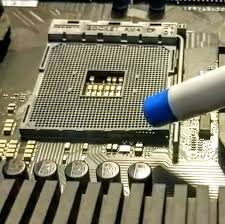
The CPU socket is one of the most critical components on a computer motherboard. It securely connects the processor (CPU) to the motherboard and ensures stable electrical communication. When this socket is damaged, the system may fail to boot, overheat, or show no display. CPU Socket Replacement becomes essential in such cases to restore system functionality and prevent further hardware damage.
Modern motherboards use advanced socket designs with delicate pins and contact points. Even a small physical defect can cause major system instability. Professional CPU Socket Replacement ensures accurate repair, compatibility, and long-term reliability.
Why CPU Socket Replacement Is Important
Ignoring a damaged CPU socket can permanently damage the processor and motherboard. Timely CPU Socket Replacement offers several benefits:
✔ Restores proper CPU connectivity
✔ Prevents CPU overheating
✔ Fixes no power or no display issues
✔ Avoids repeated system crashes
✔ Saves motherboard replacement cost
✔ Extends system lifespan
Replacing the CPU socket at the right time protects expensive components.
Common Causes of CPU Socket Damage
Understanding the causes helps prevent future failures.
✔ Bent or broken socket pins
✔ Improper CPU installation
✔ Excessive force during CPU removal
✔ Dust or foreign particles inside socket
✔ Liquid spillage on motherboard
✔ Electrical short circuit
✔ Overheating due to poor cooling
✔ Using incompatible CPU
Each cause may require professional CPU Socket Replacement.
Symptoms That Indicate CPU Socket Replacement Is Needed
You may need CPU Socket Replacement if you notice:
- Computer not turning ON
- No display but power light ON
- CPU overheating quickly
- System shuts down automatically
- Random system restarts
- BIOS not detecting CPU
- Burning smell near CPU area
- Physical damage visible in socket
These signs indicate serious motherboard-level issues.
Types of CPU Sockets Repaired or Replaced
Professional CPU Socket Replacement supports various socket types:
Intel CPU Socket Replacement
LGA 1151, LGA 1200, LGA 1700, and other Intel sockets.
AMD CPU Socket Replacement
AM4, AM5, and legacy PGA socket types.
Each socket requires model-specific tools and precision handling.
CPU Socket Replacement Process
A professional CPU Socket Replacement service includes:
1. Detailed Motherboard Diagnosis
Confirming socket damage and ruling out CPU failure.
2. CPU Compatibility Check
Ensuring the processor is undamaged and reusable.
3. Socket Removal
Careful desoldering of the damaged socket using rework stations.
4. New Socket Installation
Precision alignment and soldering of the replacement socket.
5. Pin & Contact Testing
Ensuring all socket connections are intact.
6. BIOS & Boot Testing
Verifying CPU detection and stable system startup.
7. Stress & Temperature Testing
Ensuring proper thermal performance.
Benefits of Professional CPU Socket Replacement
Choosing expert CPU Socket Replacement ensures:
✔ Accurate fault diagnosis
✔ Advanced BGA & rework tools
✔ Compatible socket installation
✔ CPU safety during repair
✔ Stable system performance
✔ Warranty-backed service
Professional repair avoids irreversible damage.
CPU Socket Replacement vs Motherboard Replacement
CPU Socket Replacement Is Recommended When:
✔ Motherboard is otherwise healthy
✔ Socket damage is localized
✔ CPU is valuable and undamaged
✔ Repair cost is economical
Motherboard Replacement Is Better When:
✖ PCB tracks are severely damaged
✖ Multiple chipset failures exist
✖ Liquid damage is widespread
✖ Repair cost exceeds board value
Expert evaluation helps choose the right option.
CPU Socket Replacement for Desktop Computers
Professional CPU Socket Replacement services are ideal for:
- Office desktop computers
- Gaming PCs
- Workstations
- Educational lab systems
- Business servers (non-enterprise boards)
Precision repair ensures performance stability.
Common Issues Fixed After CPU Socket Replacement
After successful CPU Socket Replacement, issues such as:
✔ No display problem
✔ CPU overheating
✔ Boot loop errors
✔ CPU not detected
✔ Sudden shutdowns
are permanently resolved.
Precautions After CPU Socket Replacement
To avoid repeat socket damage:
- Install CPU carefully with correct alignment
- Do not force CPU into socket
- Use proper thermal paste
- Ensure adequate cooling
- Avoid frequent CPU removal
- Keep motherboard free from dust and moisture
Proper handling protects the repaired socket.
Why Choose Expert CPU Socket Replacement Service
DIY CPU socket repair can cause:
✖ Permanent motherboard damage
✖ Broken PCB tracks
✖ CPU pin destruction
✖ Total system failure
Professional CPU Socket Replacement provides:
✔ Skilled motherboard technicians
✔ Precision soldering equipment
✔ Safe CPU handling
✔ Reliable and tested repairs
Expert service ensures peace of mind.
For computer repair and motherboard services, visit:
Learn about CPU sockets and processors:
Conclusion
A damaged CPU socket can completely disable a computer system, but replacing the entire motherboard is not always necessary. Professional CPU Socket Replacement restores proper CPU connectivity, system stability, and thermal performance at a significantly lower cost. With expert diagnosis, precision tools, and careful handling, CPU socket replacement offers a reliable and long-lasting solution for motherboard CPU issues.
Table of Contents
Quick Links
C P U Socket Replacement – Best Solution for Motherboard CPU Issues
The CPU socket is one of the most critical components on a computer motherboard. It securely connects the processor (CPU) to the motherboard and ensures stable electrical communication. When this socket is damaged, the system may fail to boot, overheat, or show no display. C P U Socket Replacement becomes essential in such cases to restore system functionality and prevent further hardware damage.
Modern motherboards use advanced socket designs with delicate pins and contact points. Even a small physical defect can cause major system instability. Professional C P U Socket Replacement ensures accurate repair, compatibility, and long-term reliability.
Why C P U Socket Replacement Is Important
Ignoring a damaged CPU socket can permanently damage the processor and motherboard. Timely C P U Socket Replacement offers several benefits:
✔ Restores proper CPU connectivity
✔ Prevents CPU overheating
✔ Fixes no power or no display issues
✔ Avoids repeated system crashes
✔ Saves motherboard replacement cost
✔ Extends system lifespan
Replacing the CPU socket at the right time protects expensive components.
Common Causes of CPU Socket Damage
Understanding the causes helps prevent future failures.
✔ Bent or broken socket pins
✔ Improper CPU installation
✔ Excessive force during CPU removal
✔ Dust or foreign particles inside socket
✔ Liquid spillage on motherboard
✔ Electrical short circuit
✔ Overheating due to poor cooling
✔ Using incompatible CPU
Each cause may require professional C P U Socket Replacement.
Symptoms That Indicate C P U Socket Replacement Is Needed
You may need C P U Socket Replacement if you notice:
Computer not turning ON
No display but power light ON
CPU overheating quickly
System shuts down automatically
Random system restarts
BIOS not detecting CPU
Burning smell near CPU area
Physical damage visible in socket
These signs indicate serious motherboard-level issues.
Types of CPU Sockets Repaired or Replaced
Professional C P U Socket Replacement supports various socket types:
Intel C P U Socket Replacement
LGA 1151, LGA 1200, LGA 1700, and other Intel sockets.
AMD C P U Socket Replacement
AM4, AM5, and legacy PGA socket types.
Each socket requires model-specific tools and precision handling.
C P U Socket Replacement Process
A professional C P U Socket Replacement service includes:
1. Detailed Motherboard Diagnosis
Confirming socket damage and ruling out CPU failure.
2. CPU Compatibility Check
Ensuring the processor is undamaged and reusable.
3. Socket Removal
Careful desoldering of the damaged socket using rework stations.
4. New Socket Installation
Precision alignment and soldering of the replacement socket.
5. Pin & Contact Testing
Ensuring all socket connections are intact.
6. BIOS & Boot Testing
Verifying CPU detection and stable system startup.
7. Stress & Temperature Testing
Ensuring proper thermal performance.
Benefits of Professional C P U Socket Replacement
Choosing expert C P U Socket Replacement ensures:
✔ Accurate fault diagnosis
✔ Advanced BGA & rework tools
✔ Compatible socket installation
✔ CPU safety during repair
✔ Stable system performance
✔ Warranty-backed service
Professional repair avoids irreversible damage.
C P U Socket Replacement vs Motherboard Replacement
C P U Socket Replacement Is Recommended When:
✔ Motherboard is otherwise healthy
✔ Socket damage is localized
✔ CPU is valuable and undamaged
✔ Repair cost is economical
Motherboard Replacement Is Better When:
✖ PCB tracks are severely damaged
✖ Multiple chipset failures exist
✖ Liquid damage is widespread
✖ Repair cost exceeds board value
Expert evaluation helps choose the right option.
C P U Socket Replacement for Desktop Computers
Professional C P U Socket Replacement services are ideal for:
Office desktop computers
Gaming PCs
Workstations
Educational lab systems
Business servers (non-enterprise boards)
Precision repair ensures performance stability.
Common Issues Fixed After C P U Socket Replacement
After successful C P U Socket Replacement, issues such as:
✔ No display problem
✔ CPU overheating
✔ Boot loop errors
✔ CPU not detected
✔ Sudden shutdowns
are permanently resolved.
Precautions After C P U Socket Replacement
To avoid repeat socket damage:
Install CPU carefully with correct alignment
Do not force CPU into socket
Use proper thermal paste
Ensure adequate cooling
Avoid frequent CPU removal
Keep motherboard free from dust and moisture
Proper handling protects the repaired socket.
Why Choose Expert C P U Socket Replacement Service
DIY CPU socket repair can cause:
✖ Permanent motherboard damage
✖ Broken PCB tracks
✖ CPU pin destruction
✖ Total system failure
Professional C P U Socket Replacement provides:
✔ Skilled motherboard technicians
✔ Precision soldering equipment
✔ Safe CPU handling
✔ Reliable and tested repairs
Expert service ensures peace of mind.
Internal Link (Under 120 Characters)
For computer repair and motherboard services, visit:
Computer repair and service and installation in BangaloreExternal Outbound Link (Dofollow) Learn about CPU sockets and processors: https://www.intel.com/content/www/us/en/gaming/resources/cpu-socket.html Conclusion A damaged CPU socket can completely disable a computer system, but replacing the entire motherboard is not always necessary. Professional C P U Socket Replacement restores proper CPU connectivity, system stability, and thermal performance at a significantly lower cost. With expert diagnosis, precision tools, and careful handling, CPU socket replacement offers a reliable and long-lasting solution for motherboard CPU issues. C P U Socket Replacement – Best Solution for Motherboard CPU Issues The CPU socket is one of the most critical components on a computer motherboard. It securely connects the processor (CPU) to the motherboard and ensures stable electrical communication. When this socket is damaged, the system may fail to boot, overheat, or show no display. C P U Socket Replacement becomes essential in such cases to restore system functionality and prevent further hardware damage. Modern motherboards use advanced socket designs with delicate pins and contact points. Even a small physical defect can cause major system instability. Professional C P U Socket Replacement ensures accurate repair, compatibility, and long-term reliability. Why C P U Socket Replacement Is Important Ignoring a damaged CPU socket can permanently damage the processor and motherboard. Timely C P U Socket Replacement offers several benefits: ✔ Restores proper CPU connectivity ✔ Prevents CPU overheating ✔ Fixes no power or no display issues ✔ Avoids repeated system crashes ✔ Saves motherboard replacement cost ✔ Extends system lifespan Replacing the CPU socket at the right time protects expensive components. Common Causes of CPU Socket Damage Understanding the causes helps prevent future failures. ✔ Bent or broken socket pins ✔ Improper CPU installation ✔ Excessive force during CPU removal ✔ Dust or foreign particles inside socket ✔ Liquid spillage on motherboard ✔ Electrical short circuit ✔ Overheating due to poor cooling ✔ Using incompatible CPU Each cause may require professional C P U Socket Replacement. Symptoms That Indicate C P U Socket Replacement Is Needed You may need C P U Socket Replacement if you notice: Computer not turning ON No display but power light ON CPU overheating quickly System shuts down automatically Random system restarts BIOS not detecting CPU Burning smell near CPU area Physical damage visible in socket These signs indicate serious motherboard-level issues. Types of CPU Sockets Repaired or Replaced Professional C P U Socket Replacement supports various socket types: Intel C P U Socket Replacement LGA 1151, LGA 1200, LGA 1700, and other Intel sockets. AMD C P U Socket Replacement AM4, AM5, and legacy PGA socket types. Each socket requires model-specific tools and precision handling. C P U Socket Replacement Process A professional C P U Socket Replacement service includes: 1. Detailed Motherboard Diagnosis Confirming socket damage and ruling out CPU failure. 2. CPU Compatibility Check Ensuring the processor is undamaged and reusable. 3. Socket Removal Careful desoldering of the damaged socket using rework stations. 4. New Socket Installation Precision alignment and soldering of the replacement socket. 5. Pin & Contact Testing Ensuring all socket connections are intact. 6. BIOS & Boot Testing Verifying CPU detection and stable system startup. 7. Stress & Temperature Testing Ensuring proper thermal performance. Benefits of Professional C P U Socket Replacement Choosing expert C P U Socket Replacement ensures: ✔ Accurate fault diagnosis ✔ Advanced BGA & rework tools ✔ Compatible socket installation ✔ CPU safety during repair ✔ Stable system performance ✔ Warranty-backed service Professional repair avoids irreversible damage. C P U Socket Replacement vs Motherboard Replacement C P U Socket Replacement Is Recommended When: ✔ Motherboard is otherwise healthy ✔ Socket damage is localized ✔ CPU is valuable and undamaged ✔ Repair cost is economical Motherboard Replacement Is Better When: ✖ PCB tracks are severely damaged ✖ Multiple chipset failures exist ✖ Liquid damage is widespread ✖ Repair cost exceeds board value Expert evaluation helps choose the right option. C P U Socket Replacement for Desktop Computers Professional C P U Socket Replacement services are ideal for: Office desktop computers Gaming PCs Workstations Educational lab systems Business servers (non-enterprise boards) Precision repair ensures performance stability. Common Issues Fixed After C P U Socket Replacement After successful C P U Socket Replacement, issues such as: ✔ No display problem ✔ CPU overheating ✔ Boot loop errors ✔ CPU not detected ✔ Sudden shutdowns are permanently resolved. Precautions After C P U Socket Replacement To avoid repeat socket damage: Install CPU carefully with correct alignment Do not force CPU into socket Use proper thermal paste Ensure adequate cooling Avoid frequent CPU removal Keep motherboard free from dust and moisture Proper handling protects the repaired socket. Why Choose Expert C P U Socket Replacement Service DIY CPU socket repair can cause: ✖ Permanent motherboard damage ✖ Broken PCB tracks ✖ CPU pin destruction ✖ Total system failure Professional C P U Socket Replacement provides: ✔ Skilled motherboard technicians ✔ Precision soldering equipment ✔ Safe CPU handling ✔ Reliable and tested repairs Expert service ensures peace of mind. Internal Link (Under 120 Characters) For computer repair and motherboard services, visit:
Computer repair and service and installation in BangaloreExternal Outbound Link (Dofollow) Learn about CPU sockets and processors: https://www.intel.com/content/www/us/en/gaming/resources/cpu-socket.html Conclusion A damaged CPU socket can completely disable a computer system, but replacing the entire motherboard is not always necessary. Professional C P U Socket Replacement restores proper CPU connectivity, system stability, and thermal performance at a significantly lower cost. With expert diagnosis, precision tools, and careful handling, CPU socket replacement offers a reliable and long-lasting solution for motherboard CPU issues.
